CMS Translator
Translate your Framer CMS collections with DeepL. Re-syncable mirror collections, any language, any plan.
1. Quick start
From an open Framer project:
- Open the CMS panel on the left sidebar of Framer.
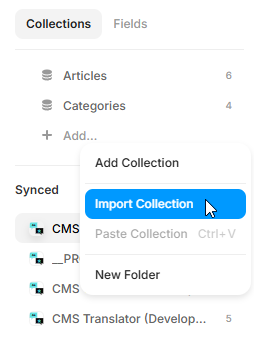
- In the Collections list, click + Add.
- Pick Import Collection in the dropdown.
- Select CMS Translator from the list of sources.
- Name your new Synced collection (e.g.
Blog — FR,Articles — ES). - Paste your DeepL API key (or use a saved one).
- Pick the source collection + target language.
- Click Translate. A Synced collection appears in your CMS panel.
- Bind a detail page to it (e.g.
/fr/blog/:slug) and publish.
2. Re-syncing translations
When your source collection changes (new article, fixed typo, added case study), open the translated mirror in your CMS panel and click Sync. The plugin detects what changed at the text-node level and re-translates only those items. The rest stays untouched.
3. Manual edits per item
Any translated item can be edited inline from the plugin. Open the translated collection, click on an item, and rewrite strings, rich text, or slugs directly. Edits stay in place on the next Sync: the plugin only re-translates upstream changes, it never overwrites your manual tweaks.
Useful when DeepL misses a nuance, for marketing copy that should not be machine-translated word-for-word, or when you want a local variant of a shared phrase.
4. Glossary
Protect brand names, product terms, technical jargon across all translations. Add terms in the Glossary panel:
- Keep as-is: term is preserved untouched in every language.
- Custom per language: define a specific translation for each target language (e.g. "Capsule" stays "Capsule" in English but becomes "Kapsule" in German).
Glossary is shared across all translated collections in the project.
5. Supported languages
15+ built-in languages (English, French, Spanish, German, Italian, Portuguese, Dutch, Polish, Russian, Japanese, Chinese simplified, Chinese traditional, Korean, Arabic, Turkish, more).
Need a language not in the list? Enter any ISO code (th for Thai, vi for Vietnamese, sw for Swahili) and DeepL handles it if supported. Non-supported codes fall back to the closest match with a warning.
6. What gets translated
- Yes — strings, headings, body text.
- Yes — rich text with formatting preserved (bold, italic, links, lists, images kept in place).
- Yes — slugs (optional, recommended for SEO).
- Yes — enum fields (status, categories): all cases preserved so filtering and sorting still work.
- No — collection reference fields (skipped with a warning; reconnect manually in the mirror if needed).
- No — numbers, dates, booleans, images, file URLs (carried over untouched).
7. DeepL API key setup
- Sign up for a free DeepL API account at deepl.com/pro-api. No credit card required.
- Find your Authentication Key in the DeepL dashboard (Account → API Keys).
- Paste it into the plugin when prompted.
- DeepL closed its old 500k-per-month free API plan to new signups; new accounts get a one-time 1,000,000-character credit that does not reset. The plugin reports remaining characters after each translation.
8. Free vs Pro
| Feature | Free | Pro (€19 one-time) |
|---|---|---|
| Collections | 1 translation total | Unlimited |
| Languages | Any built-in or custom | Any built-in or custom |
| Re-sync | — | Yes, one-click |
| Formatting preserved | Yes | Yes |
| Slugs translated | Yes | Yes |
| Priority support | — | Yes |
| Lifetime updates | — | Yes |
Bundle with Page Translator (static pages) for €39 total via the Translation Pack.
9. Troubleshooting
"Translate button is disabled"
Check that you've selected a source collection, a target language, and validated your DeepL key. If all three are green and the button still doesn't work, your free translation may already be consumed. Upgrade to Pro to continue.
"Some items were skipped"
Collection references can't be translated directly. The plugin warns about skipped refs during setup. You can reconnect them manually in the synced collection after translation.
"Quota exceeded" error from DeepL
You've hit the monthly limit of your DeepL tier. Either wait for the next cycle, upgrade your DeepL plan, or split the translation into smaller batches.
"My synced collection is missing metadata"
Rare edge case: the collection was created outside the plugin or the link to the source was lost. Create a new synced collection via + Add Collection → CMS Translator.
10. FAQ
Does this work with Framer Locales?
No, it's a standalone plugin. Framer Locales is a paid add-on that handles translation differently. CMS Translator works on any Framer plan (Free, Basic, Pro, Scale) without requiring the Locales module.
Can I use an LLM instead of DeepL?
Not in V1. LLM copy/paste mode is on the roadmap for a future update, same pattern as Page Translator.
What happens if I uninstall the plugin?
Your Synced collection stays in your project as an orphan. The data is preserved. You can bind it to pages normally, but the Sync button will no longer work until you reinstall.
Refund policy?
If Pro doesn't work as described, email me within 14 days of purchase for a full refund. Your translated collection stays in your project after you uninstall, so a refund covers a fault, not a change of mind. Full policy.
Privacy?
Translation requests transit through the DeepL API (your key, your account). Nothing is stored on my servers. Plugin analytics are handled via PostHog (anonymized, EU-hosted).
11. Support
Bug reports, feature requests, or questions:
- Email pro.allali.ilies@gmail.com
- DM on the Framer Community (
@ilies-allali)